TTL(Time To Live) 다루기
✒️ 2026-07-01 19:02 내용 수정
실습 참고 자료
- 인프런의 lettuce를 이용하여 redis 다루어 보기(저자: 신현호) 강의 내용을 참고하여 진행하였다.
- SpringBoot와 Redis 연결의 테스트 코드에서 추가로 진행한다.
package myproject.redis.lettuce.string;

import io.lettuce.core.RedisClient;
import io.lettuce.core.RedisURI;
import io.lettuce.core.api.StatefulRedisConnection;
import io.lettuce.core.api.sync.RedisCommands;
import org.junit.jupiter.api.Test;

import java.time.Duration;

public class RedisLettuceString {
    @Test
    public void setGet() {
        // host 주소
        String host = "localhost";

        // Redis 연결 주소 생성
        RedisURI redisURI = RedisURI.builder()
                .withHost(host)
                .withPort(6379) // 포트 번호. Docker에서 설정한 값과 동일하게 설정
                .withDatabase(0) // 0 - 15까지 존재
                .build();

        // Redis 클라이언트 생성
        RedisClient redisClient = RedisClient.create(redisURI);

        // Connection 연결
        StatefulRedisConnection<String, String> connection = redisClient.connect();

        // Redis 명령어
        RedisCommands<String, String> redisCommands = connection.sync();

        // Redis 연결 테스트를 위한 Key-value
        String key = "lettuce:string";
        String value = "hello";

        // Redis에 Key-value 저장
        redisCommands.set(key, value);

        // 저장된 Key로 value 확인
        String get = redisCommands.get(key);
        System.out.println("get = " + get);

		// DB 사용이 완료되면 connection을 끊고 Client도 종료한다.
        connection.close();
		redisClient.shutdown();
    }
}
TTL(Time To Live)
- key-value 데이터의 만료 시간을
expire함수로 설정할 수 있다.
 * ttl 숫자에 따른 특징
 * -1 : 만료 시간 없음(Redis가 살아 있는 한 데이터 유지)
 * 양수 : 지정한 만료 시간
 * -2 : Key 없음
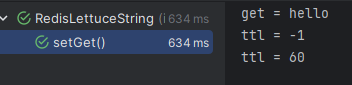
@Test
public void setGet() {

	// 생략


	// TTL : Time To Live
	Long ttl = redisCommands.ttl(key);

	/**
	 * ttl 숫자에 따른 특징
	 * -1 : 만료 시간 없음(Redis가 살아 있는 한 데이터 유지)
	 * 양수 : 지정한 만료 시간
	 * -2 : Key 없음
	*/
	System.out.println("ttl = " + ttl);

	redisCommands.expire(key, Duration.ofMinutes(1));
	System.out.println("ttl = " + redisCommands.ttl(key));
}
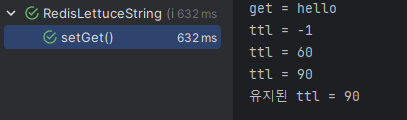
- value를 변경하면 TTL이 초기화되므로 TTL을 새로 지정하거나 기존 TTL을 유지하도록
set()메서드에SetArgs인자를 설정하여 전달하는 것으로 처리할 수 있다.
@Test
public void setGet() {

	// 생략


	// TTL : Time To Live
	Long ttl = redisCommands.ttl(key);

	/**
	 * ttl 숫자에 따른 특징
	 * -1 : 만료 시간 없음(Redis가 살아 있는 한 데이터 유지)
	 * 양수 : 지정한 만료 시간
	 * -2 : Key 없음
	*/
	System.out.println("ttl = " + ttl);

	redisCommands.expire(key, Duration.ofMinutes(1));
	System.out.println("ttl = " + redisCommands.ttl(key));

	// value 변경 시 ttl이 초기화되기에 새 ttl 설정 인자를 넘겨줘야 함
	SetArgs setArgs = SetArgs.Builder.ex(90);
	redisCommands.set(key, value + "_new", setArgs);
	System.out.println("ttl = " + redisCommands.ttl(key));

	// value만 변경하고 만료시간을 유지할 때
	SetArgs setArgsNew = SetArgs.Builder
	        .keepttl(); // redis 6.0 이상
	redisCommands.set(key, value + "_new_2", setArgsNew);
	System.out.println("유지된 ttl = " + redisCommands.ttl(key));
}
조회 명령어(Redis 6.2 이상)
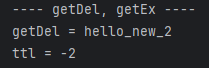
getDel: 조회와 동시에 데이터 삭제getEx: 조회와 동시에 TTL을 새로 지정
@Test
public void setGet() {

	// 생략

	// getDel, getEx
	String getDel = redisCommands.getdel(key);
	System.out.println("getDel = " + getDel);

	System.out.println("ttl = " + redisCommands.ttl(key));
}
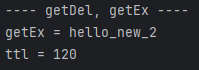
@Test
public void setGet() {

	// 생략

	GetExArgs getExArgs = GetExArgs.Builder.ex(120);
	String getEx = redisCommands.getex(key, getExArgs);

	System.out.println("getEx = " + getEx);
	System.out.println("ttl = " + redisCommands.ttl(key));
}